> ## Documentation Index
> Fetch the complete documentation index at: https://docs.outerlayer.ai/llms.txt
> Use this file to discover all available pages before exploring further.
# Launch a session
> The one rule that decides whether a session uploads: it was launched naming the work item it is for.
A session uploads only when you start it with `OUTERLAYER_WORK` set to its [work item](/concepts#where-work-lives)'s number. Every other session stays on your machine. [What leaves your machine](/what-leaves-your-machine) covers the rest.
## Create the work item first
Launching never creates an item, so add the issue to the Work page first. Either way gives you the item's number:
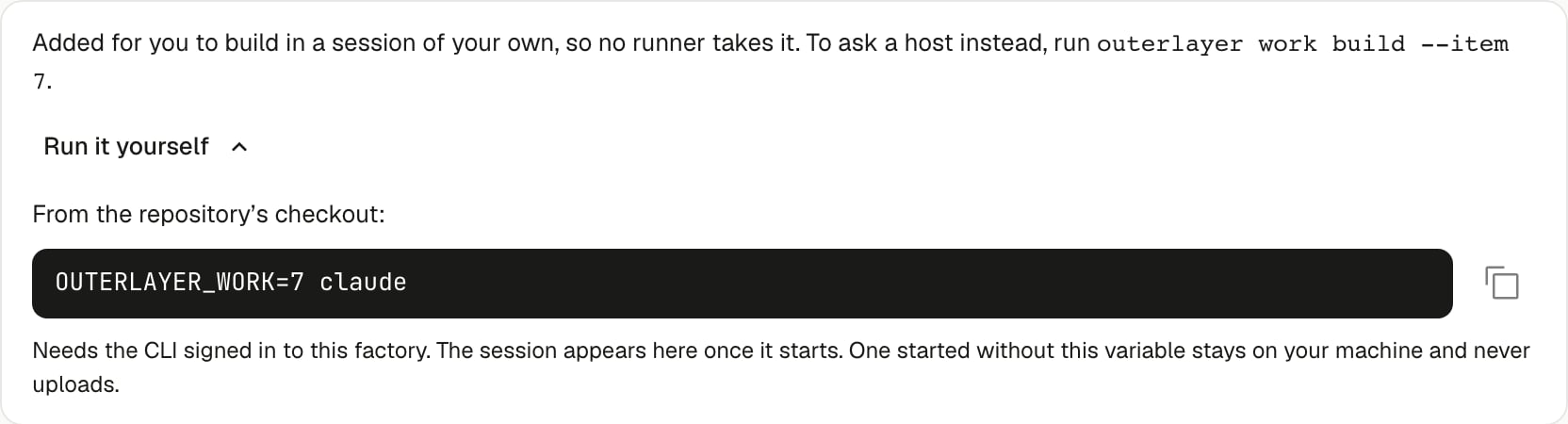
* **From the Work page.** Choose **Add work**, then **Build locally** beside the issue. The item's page opens. On its **Activity** tab, expand **Run it yourself** to see the launch command. **Build** instead asks a host to build it.
* **From a terminal**, inside the repository's checkout:
```bash theme={"system"}
npx @outerlayer/cli work build --issue 42 --local
```
It prints the item's number and the line that starts your session, such as `OUTERLAYER_WORK=7 claude`.
 ## Start a session on the item
```bash theme={"system"}
OUTERLAYER_WORK=7 claude "/build"
```
`7` is the work item's number, not the issue number. `/build` is the starter skill `outerlayer init` installs. It builds the issue into a pull request with its evidence. Leave it off to start an empty session and give your own instructions.
The session appears on item 7's page and uploads whole, from its first turn to its end.
If no host or other session holds the item, your session also takes a [claim](/concepts#who-does-the-work) on it. The claim stops a host from starting the item while you work. It is released when the session ends.
## Values `OUTERLAYER_WORK` accepts
The value must be a bare positive integer. It names an item on the factory this repository is connected to, or the factory of a piped key.
| Value | What happens |
| - | - |
| `7` | Links the session to item 7. |
| `#42`, `github:owner/repo#42`, `linear:ENG-142` | Refused on your machine. These name an issue, not an item. The session stays on your machine. The message names `outerlayer work build --local`, which creates the item. |
| A number no item has | The gateway refuses the link. Nothing is created. The session still uploads, attached to no item. |
| The number of a withdrawn item | The gateway refuses the link. The message carries the withdrawal date. The session still uploads, attached to no item. |
Every refusal reason is appended to `~/.outerlayer/spool/hook-errors.log`, and the next session start tells you so.
A refused link still uploads because the hook records the launch on your machine before the gateway answers. Only a value that is not a bare integer keeps the session local.
## Check that a session was launched
Run a dry run before uploading:
```bash theme={"system"}
outerlayer sync --dry-run
```
A launched session appears as a row. If the summary line reads `N transcript(s) — not launched with OUTERLAYER_WORK`, those sessions were started without the variable and never upload.
## Supported agents
| Agent | Captured from | Uploads as work |
| - | - | - |
| Claude Code | `~/.claude/projects` | Yes. Turns, tool input and output, thinking, images, subagents, cost. |
| Codex CLI | `~/.codex/sessions` | No. Captured on your machine only. |
| Cursor | `~/.cursor/chats` | No. Captured on your machine only. Needs Node 22.5 or later. |
Upload needs a session-start hook to record the launch, and only Claude Code has one.
## If you forgot the variable
The variable is read only when the agent starts. Exporting it inside a running session does nothing. `outerlayer work link-session` shows the session on the Work page, but its transcript still cannot upload.
End the session and resume it with the variable set:
```bash theme={"system"}
OUTERLAYER_WORK=7 claude --resume
```
The launch is recorded against the same session, and the whole transcript uploads, including the turns from before you resumed.
This documentation is built and hosted on [Mintlify](https://mintlify.com), a developer documentation platform.
## Start a session on the item
```bash theme={"system"}
OUTERLAYER_WORK=7 claude "/build"
```
`7` is the work item's number, not the issue number. `/build` is the starter skill `outerlayer init` installs. It builds the issue into a pull request with its evidence. Leave it off to start an empty session and give your own instructions.
The session appears on item 7's page and uploads whole, from its first turn to its end.
If no host or other session holds the item, your session also takes a [claim](/concepts#who-does-the-work) on it. The claim stops a host from starting the item while you work. It is released when the session ends.
## Values `OUTERLAYER_WORK` accepts
The value must be a bare positive integer. It names an item on the factory this repository is connected to, or the factory of a piped key.
| Value | What happens |
| - | - |
| `7` | Links the session to item 7. |
| `#42`, `github:owner/repo#42`, `linear:ENG-142` | Refused on your machine. These name an issue, not an item. The session stays on your machine. The message names `outerlayer work build --local`, which creates the item. |
| A number no item has | The gateway refuses the link. Nothing is created. The session still uploads, attached to no item. |
| The number of a withdrawn item | The gateway refuses the link. The message carries the withdrawal date. The session still uploads, attached to no item. |
Every refusal reason is appended to `~/.outerlayer/spool/hook-errors.log`, and the next session start tells you so.
A refused link still uploads because the hook records the launch on your machine before the gateway answers. Only a value that is not a bare integer keeps the session local.
## Check that a session was launched
Run a dry run before uploading:
```bash theme={"system"}
outerlayer sync --dry-run
```
A launched session appears as a row. If the summary line reads `N transcript(s) — not launched with OUTERLAYER_WORK`, those sessions were started without the variable and never upload.
## Supported agents
| Agent | Captured from | Uploads as work |
| - | - | - |
| Claude Code | `~/.claude/projects` | Yes. Turns, tool input and output, thinking, images, subagents, cost. |
| Codex CLI | `~/.codex/sessions` | No. Captured on your machine only. |
| Cursor | `~/.cursor/chats` | No. Captured on your machine only. Needs Node 22.5 or later. |
Upload needs a session-start hook to record the launch, and only Claude Code has one.
## If you forgot the variable
The variable is read only when the agent starts. Exporting it inside a running session does nothing. `outerlayer work link-session` shows the session on the Work page, but its transcript still cannot upload.
End the session and resume it with the variable set:
```bash theme={"system"}
OUTERLAYER_WORK=7 claude --resume
```
The launch is recorded against the same session, and the whole transcript uploads, including the turns from before you resumed.
This documentation is built and hosted on [Mintlify](https://mintlify.com), a developer documentation platform.